Day planner
Every visit has a worker before the day starts
See the whole day on one screen. Visits with no worker are flagged at the top, every worker gets their list on WhatsApp, and customers confirm their slot with one tap.
The problem
The day falls apart at 8 am
- A booking was taken but nobody was assigned, and the customer is waiting on the roof.
- Workers ring the office one by one asking for addresses.
- One worker has six jobs, another has two, on opposite sides of the city.
- Customers aren't home because nobody confirmed the time.
With SunlightDesk
What changes
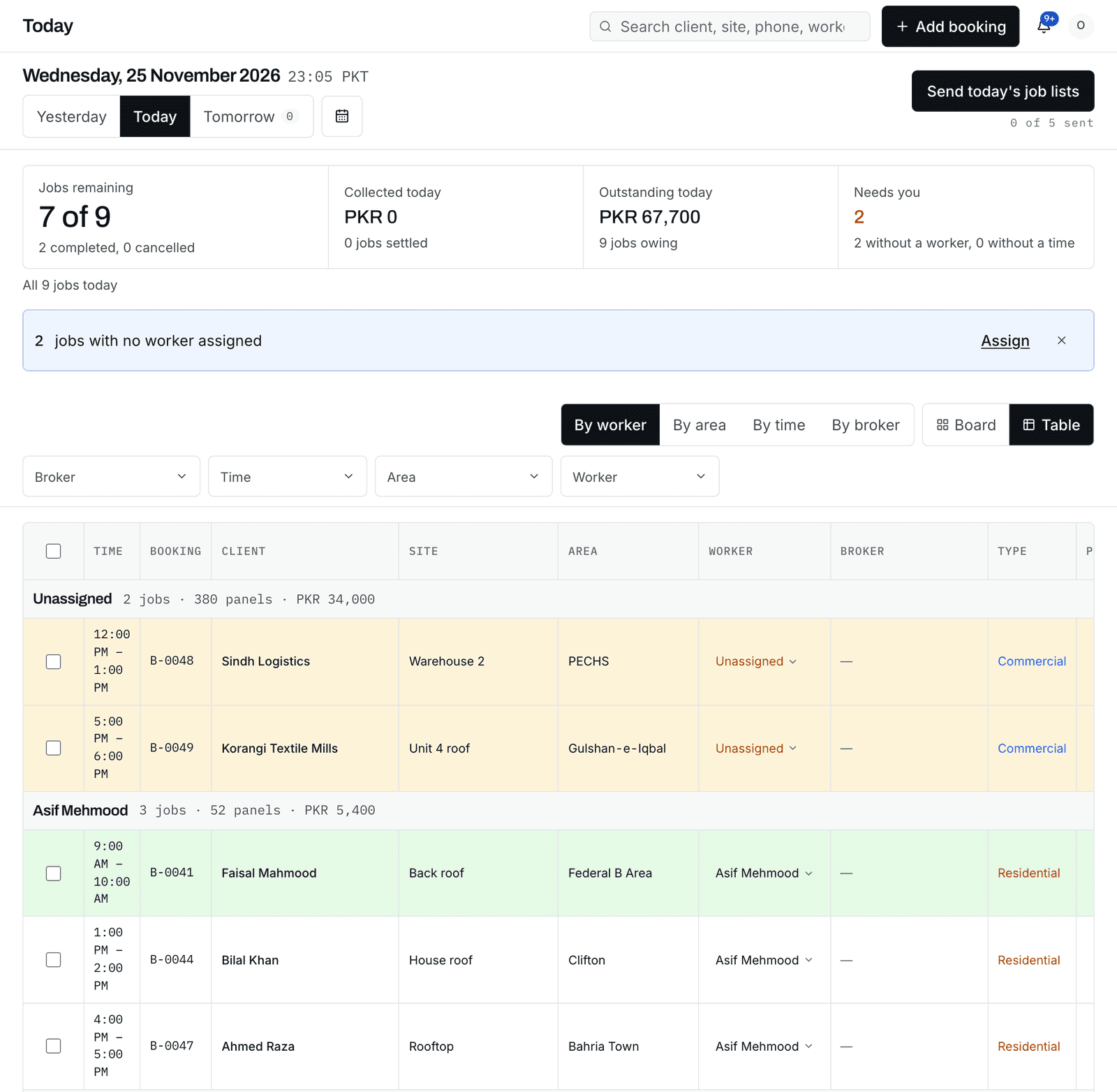
- Unassigned visits sit at the top under a banner until they have a worker.
- Each worker gets one WhatsApp list with their times, addresses and panel counts.
- Group the day by worker, area, time or broker to spot overload and long drives.
- Customers confirm tomorrow's slot with Yes or No buttons.
How it works
- 1
Open Today. Switch between a board and a table, and between yesterday, today and tomorrow.
- 2
Fix what needs you. The "Needs you" count shows visits with no worker or no time; assign them from the same screen.
- 3
Send job lists. One tap sends every worker their whole day on WhatsApp, and the system sends them each day by itself too.
- 4
Close the day. Mark visits complete, record payments from the job panel, and see what was collected.
Included
What you get with day planner
- Today, yesterday and tomorrow as a board or a table
- Group by worker, area, time or broker
- "Needs you": visits with no worker or no time
- Warnings for over-capacity workers and failed job lists
- Job lists to every worker on WhatsApp, by hand or daily
- Booking confirmations with Yes / No (Haan / Nahi) buttons
- Record and reverse payments from the job panel
- Every booking searchable by client, date, status, payment, worker and area
On every plan, with everything else in SunlightDesk. No contract. Switch the assistant off for one customer or for everyone, any day. Your data stays yours, and if you ever stop, we hand it back.
Questions
What owners ask
My workers don't use apps.
They don't need to. Their job list arrives on WhatsApp, and they send photos back on WhatsApp like they already do.
Can I still move a visit at the last minute?
Yes. Reschedule or reassign from the visit's panel; the customer gets a message when the time changes or the visit is cancelled.
What does it warn me about?
Visits with no worker, a worker over their daily capacity, payment screenshots waiting to be checked, and job lists that failed to send.
See it in 15 minutes
Message us on WhatsApp. We'll show you a new enquiry going from the first message to "yes", using your own prices, and answer anything about your business.
No contract. Switch it off any day. Your data stays yours.